
Copilot Plus PC explained in plain language is simple. It is not a brand of laptop, and it is not a single model. It is a hardware standard from Microsoft for Windows 11 laptops. The standard can run AI features on the laptop itself, without sending every task to the cloud.
A laptop either clears the bar, or it does not. If it clears the bar, it gets the Copilot Plus PC label. It can run a set of Windows AI features. If it does not clear the bar, it is still a Windows laptop, but it does not get those features.
TL;DR: Copilot Plus PC explained in one minute
A Copilot Plus PC needs three things. An NPU rated at 40 TOPS or more is needed. You also need at least 16GB of RAM and at least 256GB of storage, plus Windows 11 version 24H2 or later.
TOPS means trillion operations per second, and the NPU is the neural processing unit, a chip built to run AI tasks on the device.
Buy the Microsoft Surface Laptop 7 if you want the safest pick. Choose the Lenovo Yoga Slim 7x if you want a bright OLED screen. Pick the Acer Aspire 16 AI if your budget is tight.
Do not buy a laptop for the AI label alone. Buy it for battery life, speed, and a good screen, and treat the AI features as a bonus.
What is a Copilot Plus PC
A Copilot Plus PC is a Windows 11 laptop that meets a clear hardware bar set by Microsoft. The bar has three parts, and all three must be met.
First, the laptop needs an NPU capable of at least 40 trillion operations per second, written as 40 TOPS. Second, it needs at least 16GB of DDR5 or LPDDR5 memory. Third, it needs at least 256GB of SSD or UFS storage.
It also needs Windows 11 version 24H2 or later. It also needs the normal Windows 11 requirements, including a security processor, Windows Hello, and enhanced sign in security support.
The NPU is the key part. A normal laptop runs AI tasks on the CPU or the GPU. They are built for general work and graphics. An NPU is built for AI work only, so it can run AI tasks fast while using less power.
That matters for features that run all day, like live captions on a video call, or background blur on a webcam. Microsoft introduced Copilot Plus PCs on 20 May 2024, with the first models using Qualcomm Snapdragon X chips.
The 40 TOPS rule, and the chips that meet it
TOPS stands for trillion operations per second. It is a peak figure, not a measured speed test, so treat it as a rough guide to the size of the NPU, not as a precise ranking of speed.
For Copilot Plus PC status, only the NPU figure counts, not the combined CPU plus GPU plus NPU figure that some adverts quote.
Three chip families meet the bar today, and newer generations have joined them since. Qualcomm Snapdragon X Elite has a Hexagon NPU rated at 45 TOPS. Intel Core Ultra 200V, known as Lunar Lake, has an NPU rated at 40 to 48 TOPS. The Core Ultra 7 and Core Ultra 9 models are at 47 or 48 TOPS. The Core Ultra 5 models are at 40 TOPS. AMD Ryzen AI 300 series has an NPU rated at up to 50 TOPS. AMD Ryzen AI 400 series is rated at up to 60 TOPS in the sources checked here. Intel Core Ultra Series 3 is also listed at up to 50 TOPS.
What features do you actually get
A Copilot Plus PC unlocks a set of Windows features that run on the device. The four main features are Recall, Live Captions with translation, Cocreator in Paint, and Windows Studio Effects.
There are also smaller features. They include Click to Do, improved Windows search, and image tools in Photos, like Super Resolution and Restyle Image.
Recall is the most talked about feature, and the most controversial. It takes snapshots of what you were doing on your PC. You can search your own activity later in plain language.
After a redesign in November 2024, Recall is opt in. It requires Windows Hello biometric sign in, and snapshots are stored on the device and encrypted. It also needs 50GB of free storage to enable, and snapshot saving pauses when free space falls below 25GB.
You can turn it off, and you should decide for yourself if you want it on. Live Captions can translate audio from more than 40 languages into English. Cocreator turns a sketch into an image in Paint, and Windows Studio Effects improves video calls with blur and framing.
The shortlist for Copilot Plus PC explained in 2026
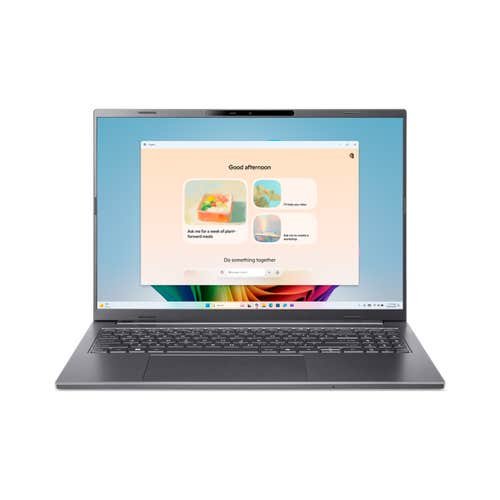
The shortlist has three laptops that cover most buyers. The Microsoft Surface Laptop 7 is the safest pick for most people. For creators who want a bright OLED screen, the Lenovo Yoga Slim 7x is the pick. On a budget, the Acer Aspire 16 AI is the pick. It is a real Copilot Plus PC at a price that used to be impossible for that label.
All three use a Snapdragon X chip with a 45 TOPS NPU. They have 16GB of RAM and 512GB of storage in the configurations checked here.
The Surface Laptop 7 starts at 1,199.99 dollars on the Microsoft Store in the US, checked 20 Nov 2026. The Snapdragon X Elite model has 16GB of RAM and 512GB of storage. It was listed at 1,399.99 dollars on the same store page. At launch the Surface Laptop 7 started at 999.99 dollars, so the current store price is higher than the launch price.
Pick for most people: Microsoft Surface Laptop 7
The Microsoft Surface Laptop 7 is the best Copilot Plus PC for most Windows buyers. It is the most polished and the easiest to live with. The chip is the Snapdragon X Elite, with a Hexagon NPU rated at 45 TOPS. It clears the Copilot Plus bar with room to spare.
The configuration in our shortlist has 16GB of RAM and 512GB of storage. That is the right floor for a Copilot Plus PC in 2026.
Battery life is the main reason to pick it. Microsoft claims up to 20 hours of local video playback for the 13.8 inch model. It claims up to 22 hours for the 15 inch model. In a Tom’s Guide web browsing test, the Surface Laptop 7 lasted 15 hours and 44 minutes. That is still a full work day and more.
The trade off is Windows on ARM. Most mainstream software now runs well, including browsers, Office, and Adobe apps. Specialist drivers, some games, and a few engineering apps can still cause trouble.
Pick for creators: Lenovo Yoga Slim 7x
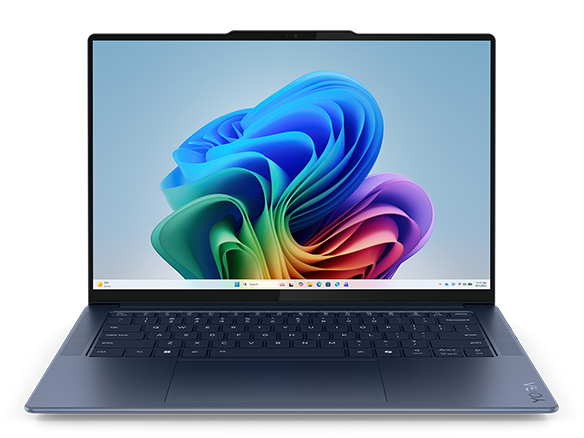
The Lenovo Yoga Slim 7x is the best Copilot Plus PC for creators who work with photos and video. It uses the same Snapdragon X Elite chip as the Surface Laptop 7, the X1E-78-100. The Hexagon NPU is rated at 45 TOPS. It has the same 16GB of RAM and 512GB of storage in the base configuration.
The difference is the screen. You get a 14.5 inch 3K OLED touch display at 90Hz, with up to 1,000 nits peak brightness. It is brighter and richer than most laptop screens at this price.
Lenovo launched it at 1,199 dollars in the US. Amazon listings in 2026 showed it at 989.99 dollars to 999.98 dollars for the 16GB and 512GB configuration. That is a large screen and a better display than the Surface Laptop 7 for less money, when it is on sale.
Who should buy a Copilot Plus PC, and who should skip it
Buy a Copilot Plus PC if you buy a new Windows laptop in 2026. Look for long battery life, quiet running, and AI features that work on the device. It is a good pick for students, for office work, for writers, and for researchers. It is also good for people who spend a lot of time on video calls.
Live Captions and Windows Studio Effects are useful every day, even if you never open Recall or Cocreator.
Skip a Copilot Plus PC if you already have a good laptop that does your work well. The AI features today are modest, and they are not worth replacing a working laptop on their own.
Skip it if you need a laptop for heavy gaming or for 3D rendering. Skip it also if you need specialist Windows software that does not run well on ARM.
FAQs about Copilot Plus PC explained
Is a Copilot Plus PC worth it
Yes, if you buy it for battery life, quiet running, and a good screen, not only for the AI features. Do not pay a large premium for the AI features alone, because they are still modest today.
Do I need 32GB of RAM for a Copilot Plus PC
Most buyers do not. 16GB is enough for everyday work, study, and light creative work with local AI features. Buy 32GB if you edit large video files, run local AI models, or keep many apps open at once.
Most Copilot Plus laptops in this guide have soldered memory, so you cannot upgrade the RAM later. Buy 32GB now if you think you will need it.
The bottom line on Copilot Plus PC explained
Copilot Plus PC explained in one line is this. It is a Windows 11 laptop with an NPU rated at 40 TOPS or more, at least 16GB of RAM, and at least 256GB of storage.
That bar unlocks Recall, Live Captions with translation, Cocreator, and Windows Studio Effects, all running on the device.
The best pick for most people is the Microsoft Surface Laptop 7, from 1,199.99 dollars on the Microsoft Store. It has a Snapdragon X Elite chip, a 45 TOPS NPU, and up to 20 hours of local video playback claimed by Microsoft. Creators should pick the Lenovo Yoga Slim 7x, launched at 1,199 dollars. It has a 14.5 inch 3K OLED screen and the same 45 TOPS NPU. The budget pick is the Acer Aspire 16 AI, listed at 799.99 dollars by Acer. It was checked at 499.99 dollars on Amazon in November 2026, with the same 45 TOPS NPU and 16GB of RAM.
Check the chip, the NPU power, the RAM, and the storage before you check the AI sticker. Check the current price on the day you buy.
Pingback: Black Friday Laptop Buying Guide 2026, How to Spot a Real Deal - techknowlogy.net
Pingback: Best Free Apps for Productivity in 2026 That Stay Free - techknowlogy.net