
Gemini November 2026 changed Gemini in Search, in the Gemini app, and on the Mac in eight days. The biggest change is in Google AI Mode. Gemini 4 Hydrogen became the default model there on 12 Nov 2026, for all users worldwide. Google Wallet in Gemini started on 13 Nov 2026 for users in the United States only. Gemini computer use on Mac started on 19 Nov 2026, also in English in the United States only, and only for paid plans.
TL;DR: Gemini November 2026 in one minute
Gemini 4 Hydrogen is now the default model in Google AI Mode, and it is also used for the hardest questions in AI Overviews. AI Mode in the United States can now show home service booking links through Angi, Thumbtack, Housecall Pro, and Jobber, with ServiceTitan coming soon. Gemini can now read Google Wallet data in the United States, if you opt in, and it can only read that data. It cannot move, manage, or invest your money. Gemini on Mac can now do multi step tasks in a background window, if you have an Apple Silicon Mac, macOS Sequoia 15.0 or later, and a Google AI Plus, Pro, or Ultra plan.
Gemini 4 Hydrogen is now the default in AI Mode
On 12 Nov 2026 Google released Gemini 4 Hydrogen and put it into Search the same day. Robby Stein, Vice President of Product for Google Search, said Hydrogen is now the default model in AI Mode, and it is also used for the hardest questions in AI Overviews. That affects every AI Mode answer, not only paid users.
Hydrogen is adapted from Gemini 4 Carbon, the deeper thinking model for Google AI Ultra subscribers. Hydrogen is the faster model in the same family, built for speed and for work with tools.
In Gemini November 2026, Google says Hydrogen is faster and more accurate in Search, and that it shows more helpful links. Those claims are Google own test results, not independent tests. Our earlier guide explains the switch.
What Gemini 4 Hydrogen changes in your answers
Google lists four changes. First, Hydrogen reads intent better. It handles multi part questions, typos, and very specific requests, without you having to break the request into careful search phrases. Second, query fan out goes wider. AI Mode splits your question into smaller parts and searches for each part at the same time. Google says this connects you to a broader range of helpful links, but it has given no link count, so that claim cannot yet be measured. Third, answers become more visual, with more images, structured responses, comparison tables, and custom tools. That helps when you compare two laptops or two plans. Fourth, language understanding improves across all supported AI Mode languages. AI Mode is listed in more than 200 countries and territories, in 98 languages, including English and Urdu.
AI Mode home service booking, United States only
On 4 Nov 2026 Google added booking and quote links for home services inside AI Mode, in the United States only. Robby Stein named Angi, Thumbtack, Housecall Pro, and Jobber as partners, with ServiceTitan coming soon. You describe a home problem in plain words, AI Mode helps you research local providers, and where it is supported it shows a booking or quote link. Angi and Thumbtack are marketplaces, so a link there usually takes you to a provider profile to request a quote. Housecall Pro and Jobber are field service tools, so a link there can open a booking form or show available times. Google has not explained how AI Mode picks or ranks providers. That is still unknown. For readers outside the United States, including readers in Pakistan, this feature is not live yet, and Google has given no date for a wider rollout.
Gemini Wallet, from 13 Nov 2026 in the United States only
In Gemini November 2026, on 13 Nov 2026 Google added Google Wallet to Personal Intelligence in Gemini. Personal Intelligence connects information from apps you already use, like Gmail, Photos, YouTube, and Search, to make answers more personal. Wallet joins that list. The rollout is for all Gemini app users in the United States, on the web and on Android and iOS, and it is gradual, so the option may not appear for every eligible user on day one.
To use it, connect Wallet under Connected Apps in Personal Intelligence settings, then tag @Google Wallet in Gemini and ask a question about personal finance. Google gives three examples. Visualize spending from last quarter, find forgotten subscriptions and price rises, and budget for the holidays from last year spending. You can also link bank and credit card accounts to Wallet through Plaid, to unlock deeper insights. Plaid says people can also connect loans and investment accounts through Plaid. Google own announcement names credit cards and banks.
Gemini Wallet is read only
Gemini Wallet is read only, and that limit is the point. If you choose to connect your Wallet, Gemini can only read information from your accounts. It cannot move, manage, or invest your money. It cannot pay a bill, transfer funds, buy anything, or change an investment. The connection is opt in. Nothing happens until you switch it on, and you can turn it off at any time. Google help also says, do not rely on Gemini output for financial advice. Use Gemini to spot a pattern, then check the bank statement before you act. You must be at least 18, use a personal Google Account, and keep Keep Activity turned on. Work, school, and supervised accounts are not supported. The Wallet connection is marked United States only in Google help, with no date for other countries.
Gemini on Mac, computer use from 19 Nov 2026
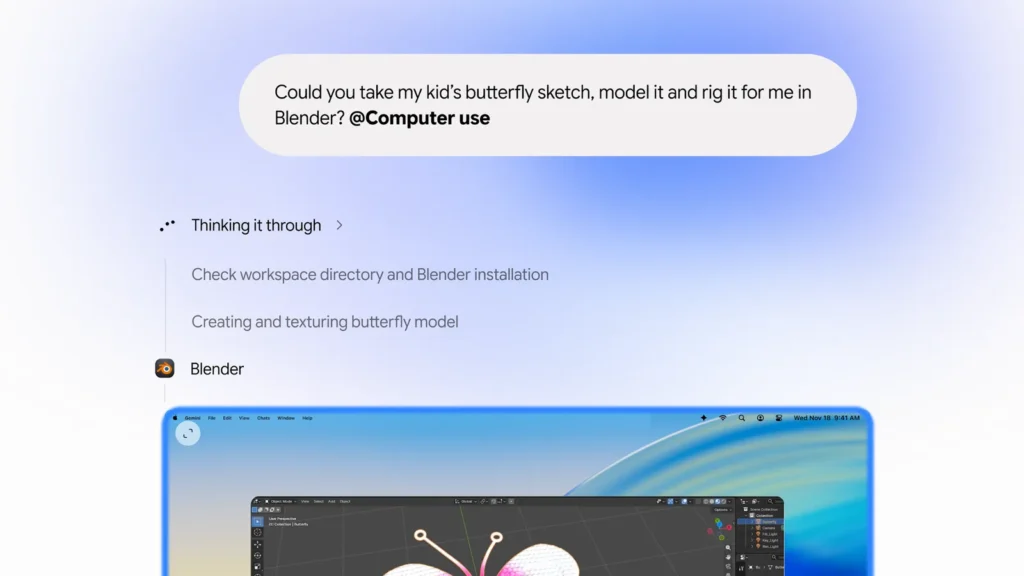
In Gemini November 2026, on 19 Nov 2026 Google began rolling out computer use in the Gemini app for Mac. Michael Friedman, Group Product Manager for the Gemini app, wrote the announcement. You describe a multi step task, and Gemini handles the clicking, typing, menus, and forms for you, across local files, desktop apps, and the web. Gemini works inside an isolated background window, with a live preview right in your chat. Your main screen and cursor remain free, so you can keep working without interruption. Google says you choose which apps Gemini can access, watch every step live, pause at any time, and approve key actions before they happen.
Google gives four examples. Batch color grade photos, or set up complex 3D scenes. Extract weights, dimensions, and addresses from local PDFs to fill out shipping quotes. Pull metrics and screenshots from live dashboards and build a presentation in Google Slides. Analyze clothing photos, research pricing, and stage listings on resale platforms.
Who can use Gemini computer use on Mac, and what it costs
Computer use is rolling out in English in the United States, in the Gemini app for Mac. Download the app at gemini.google/mac, from Google own announcement. You need an Apple Silicon Mac running macOS Sequoia 15.0 or later, a personal Google Account, age 18 or over, and a Google AI Plus, Pro, or Ultra plan. Google AI Plus starts at 4.99 dollars a month in the United States, Google AI Pro costs 19.99 dollars a month, and Google AI Ultra starts at 99.99 dollars a month, from reporting on the launch. Prices in Pakistan may differ, and [confirm the current Pakistan price before publishing, as no Pakistan price was verified in this check]. Intel Macs are outside this release, and users outside the United States are outside this release for now. Google has given no date for a later expansion.
November Pixel Drop, and what did not change
In Gemini November 2026, the November 2026 Pixel Drop began on 10 Nov 2026, and it brings Gemini Intelligence to Pixel 10, Pixel 10 Pro, Pixel 10 Pro XL, and Pixel 10 Pro Fold. It includes Rambler for clearer voice typing, plus proactive suggestions and custom widgets. Call Screen also gets a Gemini upgrade on the Pixel 11 series, currently limited to the United States. Google also introduced Pixel Tag, available from 11 Nov 2026, a separate tracking product, not a Gemini feature.
Now a correction. Gemini 3.5 Pro is not out. Google announced Gemini 3.5 on 19 May 2026, and shipped Flash the same day, while keeping Pro in a limited preview. On 30 Sep 2026 a Google spokesperson told Reuters that Google no longer plans to release 3.5 Pro.
How to try the November changes, and stay safe
Start with AI Mode at google.com/ai. Ask a multi part question, read the answer, click two links, and ask a follow up. If you are in the United States, try Wallet by turning it on under Profile, then Personal Intelligence, then Connected Apps, ask what subscriptions you pay for, and check the answer against your bank statement.
If you are on a Mac that meets the requirements, try one small, low risk task first, watch the live preview, and approve key actions. Do not start with a task that moves money, deletes files, or sends a message. Do not paste passwords, bank details, ID numbers, or private health information into Gemini. Memory Summary lets you review what Gemini remembers, under Profile, then Personal Intelligence, then Memory Summary. For computer use, Gemini needs Accessibility and Screen and System Audio Recording permissions. Grant it only on a Mac you control, and only for tasks you can watch.
FAQs about Gemini November 2026
Is Gemini 4 Hydrogen free in AI Mode
Yes. Hydrogen is the default model in AI Mode for all users worldwide, since 12 Nov 2026. You do not need a paid plan to get it.
Can I use Gemini Wallet in Pakistan
No, not yet. The Wallet connection is rolling out to Gemini app users in the United States only. Google has given no date for Pakistan.
Can Gemini move money from my Wallet
No. Google says Gemini can only read information from your accounts. It cannot move, manage, or invest your money. The connection is opt in, and you can turn it off at any time.
The bottom line on Gemini November 2026
Gemini November 2026 is not one launch. It is a global model change, plus three United States only rollouts, plus a Pixel update. The global change matters most. Gemini 4 Hydrogen is now the default in AI Mode. Try it with a real, multi part question, and check the links before you trust the answer. Wallet is read only by design, and computer use on Mac is useful only if you have the right Mac and plan. If you are in Pakistan, wait for Google to confirm availability, and use the Hydrogen change in AI Mode today.
Sources
- Google Wallet: https://blog.google/innovation-and-ai/products/gemini-app/google-wallet-gemini-app/
- Google Mac computer use: https://blog.google/innovation-and-ai/products/gemini-app/computer-use-mac/
- Search Engine Journal: https://www.searchenginejournal.com/google-gemini-4-hydrogen-default-ai-mode/597096/
- MacRumors: https://www.macrumors.com/2026/11/19/google-gemini-mac-app-control/
- Google Support AI Mode: https://support.google.com/websearch/answer/16011537